Fix Your Underwater Photos
with a Proven Lightroom Workflow
Stop guessing what to adjust and when.
Learn the exact step-by-step process I use to turn underwater photos from dull to WOW.
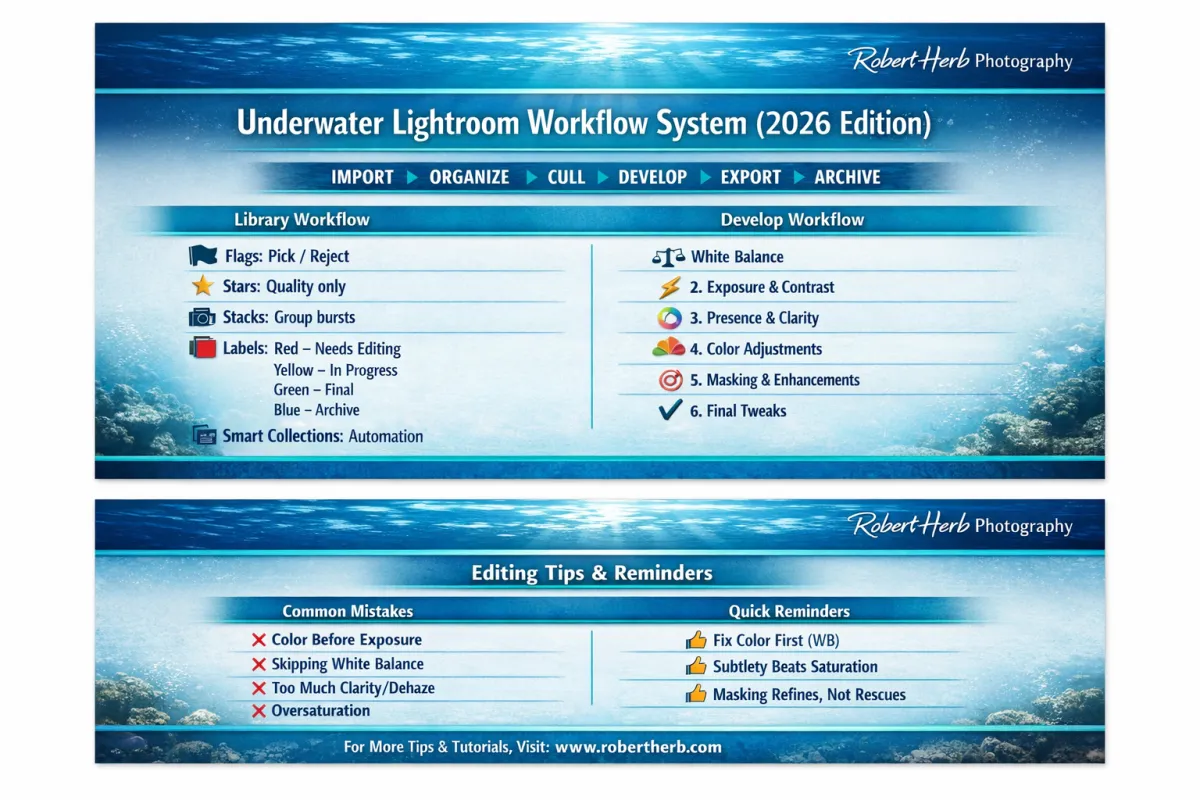
What you’ll learn:
✔ The exact order to edit underwater photos in Lightroom
✔ How to restore natural color and eliminate blue/green casts
✔ Where most photographers go wrong (and how to fix it)
✔ A repeatable workflow you can use on every dive
✔ How to stop over-editing and start creating natural, vibrant images
This is not a preset. It’s a system.
Hi, I’m Bob Herb.
Professional underwater photographer with 9,600+ dives and 50+ years behind the camera.
This is the exact workflow I use every day to turn underwater photos from dull, blue images into natural, vibrant results.
Download the Free Workflow Guide
Why Your Underwater Photos Look Flat
If your underwater photos look blue, flat, or lifeless… this is why.
Underwater, color disappears fast.
Reds go first, then oranges and yellows, leaving your photos looking blue, green, and lifeless.
Most photographers try to fix this by randomly adjusting sliders.
That leads to:
Overprocessed images
Unrealistic colors
Inconsistent results
The solution is not more tools.
It’s a structured workflow.
Get the Workflow and Start Fixing Your Photos Today
Download the workflow guide and start transforming your underwater photos today.
🎁 Bonus: Also get my “10 Lightroom Fixes Every Underwater Photographer Should Know” guide
“10 Lightroom Fixes Every Underwater Photographer Should Know”